spAriaUtil
The spAriaUtil API provides methods to show messages on a screen reader.
This API is an angular service that you can use in Service Portal widget client scripts.
sendLiveMessage(String message)
Announce a message to a screen reader.
The sendLiveMessage() method injects text into an aria-live region on the page. The default setting for an aria-live region is assertive, which means that messages are announced immediately. This can annoy and confuse users if used too frequently.
Parameters
| Name | Type | Description |
|---|---|---|
| message | String | The message to be shown. |
Returns
| Type | Description |
|---|---|
| void | Method does not return a value |
Example
function(spAriaUtil) {
  /* widget controller */

  spAriaUtil.sendLiveMessage('Hello world!');
}
Version: zurich
API Reference – Client Side
ServiceNow provides client-side JavaScript APIs allowing all of you to control aspects of how ServiceNow is displayed and functions within the web browser. This reference lists available classes and methods along with parameters, descriptions, and examples to make controlling the end user experience easier.
spContextManager
Makes data from a Service Portal widget available to other applications and services in a Service Portal page. For example, pass widget data to Agent Chat when it opens in a Service Portal page.
The spContextManager API is an AngularJS service that you can use in Service Portal widget client scripts.
Keys passed to this API are unique per page. For example, if the 'agent-chat' key is already initialized by another widget on the page through the addContext() method, you must use the updateContextForKey() method to update the key’s data. Available keys include: agent-chat: Sends widget data to Agent Chat.
For more information about passing data to Agent Chat, see Configure Agent Chat in Service Portal.
addContext(String key, Object context)
Initializes a key and adds widget data as the value. For example, add data to the ‘agent-chat’ key to make it available to Agent Chat.
Use this method the first time data is added to a specific key on a Service Portal page. If the key is already used by another widget on the page, use the updateContextForKey() method instead.
Parameters
| Name | Type | Description |
|---|---|---|
| key | String | Name of the key to send the data. Available keys includeagent-chat: Sends widget data to Agent Chat when it opens in a Service Portal page. |
| context | Object | Widget data in JSON format to send to the application or service specified in the key parameter. For example, {'approval_count': 5}. |
Returns
| Type | Description |
|---|---|
| void | Method does not return a value |
Example
Pass approval_count to Agent Chat. When a user initiates an Agent Chat conversation from the Service Portal homepage, the system appends &sysparm_approval_count=5 to the Agent Chat iframe URL.
function ($scope, spContextManager) {
    spContextManager.addContext('agent-chat', {
        'approval_count': 5
    });
};
getContext()
Returns each key and associated data object defined by any widget on the page.
Using this method may affect performance. Use this method to understand which keys are initialized on the page and to get their current values. If you know which key you need to access, use the getContextForKey() method instead.
Returns
| Type | Description |
|---|---|
| Object | Each key and associated data object defined on the page. |
Example
function ($scope, spContextManager) {
  spContextManager.getContext();
}
getContextForKey(String key, Boolean returnPromise)
Returns the widget data associated with a key.
Parameters
| Name | Type | Description |
|---|---|---|
| key | String | Name of the key to get context from. Available keys include: agent-chat: Sends widget data to Agent Chat. |
| returnPromise | Boolean | Flag that determines whether to return the data associated with a key as a promise or an object. Values include: True: return the data as a promise. Use this option if another widget on the page uses the addContext() method to initialize the same key. Returning a promise prevents returning an undefined object when the key is not yet initialized. False: returns an object containing the data associated with the key. |
Returns
| Type | Description |
|---|---|
| Promise | If returnPromise is true, returns a promise that is fulfilled when another widget on the page initializes the key. |
| Object | If returnPromise is false, returns an object containing the data associated with the key. For example, {approval_count: 5}. |
Example
Pass approval_count to Agent Chat. When a user initiates an Agent Chat conversation from the Service Portal homepage, the system appends &sysparm_approval_count=5 to the Agent Chat iframe URL.
function ($scope, spContextManager) {
  spContextManager.getContextForKey('agent-chat', true).then(function(context) {
    context = context || {};
    context.approval_count = 5;
    spContextManager.updateContextForKey('agent-chat', context);
  });
}
updateContextForKey(String key, Object context)
Sends data to an existing key. For example, if another widget on the page uses the ‘agent-chat’ key to pass data to the Agent Chat configuration, you must update the context of the key rather than using the addContext() method.
Parameters
| Name | Type | Description |
|---|---|---|
| key | String | Name of the key to send the data. Available keys includeagent-chat: Sends widget data to Agent Chat when it opens in a Service Portal page. |
| context | Object | Widget data in JSON format to send to the application or service specified in the key parameter. For example, {'approval_count': 5}. |
Returns
| Type | Description |
|---|---|
| void | Method does not return a value |
Example
Pass approval_count to Agent Chat. When a user initiates an Agent Chat conversation from the Service Portal homepage, the system appends &sysparm_approval_count=5 to the Agent Chat iframe URL.
function ($scope, spContextManager) {
  spContextManager.getContextForKey('agent-chat', true).then(function(context) {
    context = context || {};
    context.approval_count = 5;
    spContextManager.updateContextForKey('agent-chat', context);
  });
}
Version: zurich
API Reference – Client Side
ServiceNow provides client-side JavaScript APIs allowing all of you to control aspects of how ServiceNow is displayed and functions within the web browser. This reference lists available classes and methods along with parameters, descriptions, and examples to make controlling the end user experience easier.
spModal
Shows alerts, prompts, and confirmation dialogs in Service Portal widgets. The spModal class is available in Service Portal client scripts.
The spModal class is a lightweight wrapper for Angular UI bootstrap’s $uibModal. You can use the spModal.open() method to display a widget in a modal dialog.
alert(String message).then(fn)
Displays an alert.
Parameters
| Name | Type | Description |
|---|---|---|
| message | String | The message to display. |
Returns
| Type | Description |
|---|---|
| Boolean | The promise contains a single argument that contains true or false. |
Example
// HTML template
<button ng-click="c.onAlert()" class="btn btn-default">
    Alert
  </button>

// Client script
function(spModal) {
    var c = this;
  c.onAlert = function () {
        spModal.alert('How do you feel today?').then(function (answer) {
            c.simple = answer;
        });
    }
 }
confirm(String message).then(fn)
Displays a confirmation message.
Parameters
| Name | Type | Description |
|---|---|---|
| message | String | The message to display. |
Returns
| Type | Description |
|---|---|
| Boolean | The promise contains a single argument that contains true or false. |
Example
// HTML template
 <button ng-click="c.onConfirm()" class="btn btn-default"> Confirm </button>
<span>{{c.confirmed}}</span>

// Client script
function(spModal) {
  var c = this;
  c.onConfirm = function() {
        c.confirmed = "asking";
        spModal.confirm("Can you confirm or deny this?").then(function(confirmed) {
            c.confirmed = confirmed; // true or false
        })
    }
 }
Example
Confirm with HTML message:
//HTML template
<button ng-click="c.onConfirmEx()" class="btn btn-default">
    Confirm - HTML message
  </button>
  <span>{{c.confirmed}}</span>

// Client script
function(spModal) {
  var c = this;
  // more control, passing options
    c.onConfirmEx = function() {
        c.confirmed = "asking";
        var warn = '<i class="fa fa-warning" aria-hidden="true"></i>';
        spModal.open({
            title: 'Delete this Thing?',
            message: warn + ' Are you <b>sure</b> you want to do that?'
        }).then(function(confirmed) {
            c.confirmed = confirmed;
        })
    }
}
open(Object options).then(fn)
Opens a modal window using the specified options.
Parameters
| Name | Type | Description |
|---|---|---|
| options | Object | An object that may have these properties. backdrop: Boolean|String. Controls the presence of a backdrop. Valid values: true: Displays backdrop. false: No backdrop. static: Disables modal closing by selecting the backdrop. Default: true buttons: Array. Buttons to show on the dialog. The default is Cancel and OK. input: Boolean. When true, shows an input field on the dialog. Default: false keyboard: Boolean. When true, indicates that the dialog is closeable using the ESC key.Default: true message: String. HTML that goes in the header. Default: empty noDismiss: Boolean. When true, indicates that the header section containing the close icon isn’t present.Default: false shared: Client-side object. Shares data with the embedded widget client script. size: String. Size of the window. Valid values: ‘sm’ or ‘lg’. Default: empty title: String. HTML that goes in the header. Default: empty value: String. Value of the input field. Default: empty widget: String. Widget ID or sys_id to embed in the dialog. Default: empty widgetInput: Object. Sent to the embedded widget as input. Default: null |
Returns
| Type | Description |
|---|---|
| void | Method does not return a value |
Example
The following code shows how to create a prompt with a label.
//HTML template
<button ng-click="c.onOpen()" class="btn btn-default">
    Prompt with label
  </button>
  <div ng-show="c.name">
    You answered <span>{{c.name}}</span>
  </div>

//Client code
function(spModal) {
  var c = this;
  c.onOpen = function() {
        //ask the user for a string
        spModal.open({
            title: 'Give me a name',
            message: 'What would you like to name it?',
            input: true,
            value: c.name
        }).then(function(name) {
            c.name = name;
        })
    }
}
Example
The following code shows how to use the custom buttons option.
//HTML template
<button ng-click="c.onAgree()" class="btn btn-default">
    Agree
  </button>
  <div ng-show="c.agree">
    You answered {{c.agree}}
  </div>

//Client script
function(spModal) {
  var c = this;
  c.onAgree = function() {
        // ask the user for a string
        // note embedded html in message
        var h = '<h4>Apple likes people to agree to lots of stuff</h4>'
        // Line feeds added to the following lines for presentation formatting.
        var m = 'Your use of Apple software or hardware products is based
on the software license and other terms and conditions in effect for the
product at the time of purchase. Your agreement to these terms is required
to install or use the product. '
        spModal.open({
            title: 'Do you agree?',
            message: h + m,
            buttons: [
                {label:'✘ ${No}', cancel: true},
                {label:'✔ ${Yes}', primary: true}
            ]
        }).then(function() {
            c.agree = 'yes';
        }, function() {
            c.agree = 'no';
        })
    }
}
Example
The following code shows how to use the embedded widget option.
//HTML template
<button ng-click="c.onWidget('widget-cool-clock')" class="btn btn-default">
    Cool Clock
  </button>

//Client script
function(spModal) {
  var c = this;
  c.onWidget = function(widgetId, widgetInput) {
        spModal.open({
            title: 'Displaying widget ' + widgetId,
            widget: widgetId,
            widgetInput: widgetInput || {}
        }).then(function(){
            console.log('widget dismissed');
        })
    }
}
prompt(String message, String default).then(fn)
Displays a prompt for user input.
Parameters
| Name | Type | Description |
|---|---|---|
| message | String | The message to display. |
| default (optional) | String | A default value to use if the user does not provide a response. |
Returns
| Type | Description |
|---|---|
| String | The promise contains the user’s response, or the default value if the user does not enter a response. |
Example
//HTML template
 <button ng-click="c.onPrompt()" class="btn btn-default">
    Prompt
  </button>
  <div ng-show="c.name">
    You answered <span>{{c.name}}</span>
  </div>

// Client script
function(spModal) {
  var c = this;
  c.onPrompt = function() {
        spModal.prompt("Your name please", c.name).then(function(name) {
            c.name = name;
        })
    }
}
Version: zurich
API Reference – Client Side
ServiceNow provides client-side JavaScript APIs allowing all of you to control aspects of how ServiceNow is displayed and functions within the web browser. This reference lists available classes and methods along with parameters, descriptions, and examples to make controlling the end user experience easier.
spUtil
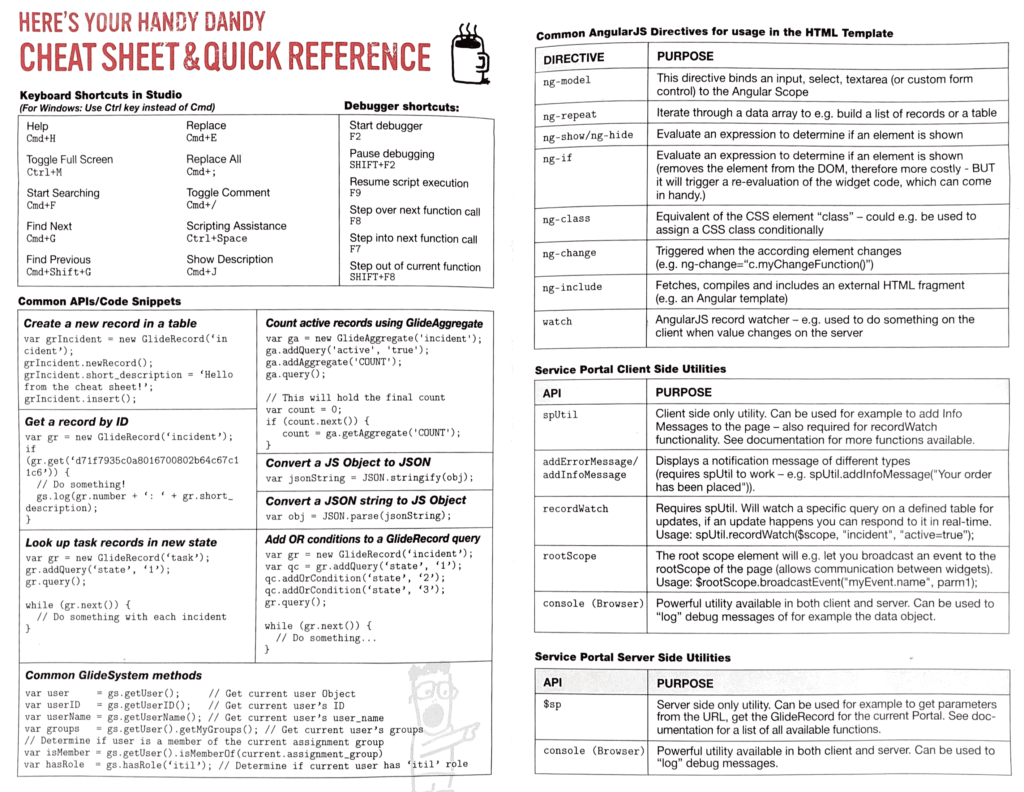
The spUtil API provides utility methods to perform common functions in a Service Portal widget client script.
These functions include:
- Display a notification error message. spUtil – addErrorMessage(String message)
- Display a notification info message. spUtil – addInfoMessage(String message)
- Display a trivial notification message. spUtil – addTrivialMessage(String message)
- Create a unique identifier. spUtil – createUid()
- Format a string with variables. spUtil – format(String template, Object data)
- Embed a widget model in a widget client script. spUtil – get(String widgetId Object data)
- Retrieve all headers to use for API calls. spUtil – getHeaders()
- Return the complete host domain. spUtil – getHost()
- Execute the callback with User Preference response by passing the preference name. spUtil – getPreference(String preference, Function callback)
- Return the current service portal URL information. spUtil – getURL()
- Check if the current client is a mobile device. spUtil – isMobile()
- Parse the comma-separated attributes within a specified string. spUtil – parseAttributes(String attributes)
- Watch for updates to a table or filter and returns the value from the callback function. spUtil – recordWatch(Object $scope, String table, String filter, Function callback)
- Call the server and replaces the current options and data with the server response. spUtil – refresh(Object $scope)
- Scroll to the element with the specified selector, over a specified period of time. spUtil – scrollTo(String selector, Number time)
- Update the header breadcrumbs. spUtil – setBreadCrumb(Object $scope, Array breadcrumbs)
- Set a user preference. spUtil – setPreference(String pref, String value)
- Update the search page. spUtil – setSearchPage(String searchPage)
- Update the data object on the server within a given scope. spUtil – update(Object $scope)
For additional information on widgets, see Service Portal widgets.
addErrorMessage(String message)
Displays a notification error message.
Parameters
| Name | Type | Description |
|---|---|---|
| message | String | Error message to display. |
Returns
| Type | Description |
|---|---|
| void | Method does not return a value |
Example
spUtil.addErrorMessage("There has been an error processing your request")
addInfoMessage(String message)
Displays a notification info message.
Parameters
| Name | Type | Description |
|---|---|---|
| message | String | Message to display. |
Returns
| Type | Description |
|---|---|
| void | Method does not return a value |
Example
spUtil.addInfoMessage("Your order has been placed")
addTrivialMessage(String message)
Displays a trivial notification message.
Trivial messages disappear after a short period of time.
Parameters
| Name | Type | Description |
|---|---|---|
| message | String | Message to display. |
Returns
| Type | Description |
|---|---|
| void | Method does not return a value |
Example
spUtil.addTrivialMessage("Thanks for your order")
createUid()
Create a unique identifier.
Returns
| Type | Description |
|---|---|
| String | A unique 32 character ID. |
format(String template, Object data)
Formats a string that contains variables.
Use this method as an alternative to string concatenation.
Parameters
| Name | Type | Description |
|---|---|---|
| template | String | String template that contains values for variable substitution. |
| data | Object | Object containing the values for the variables defined in the template string. |
Returns
| Type | Description |
|---|---|
| String | String containing the variable values instead of the variable nomenclature. |
Example
spUtil.format('An error ocurred: {error} when loading {widget}', {error: '404', widget: 'sp-widget'})
'An error occurred: 404 when loading sp-widget'
get(String widgetId Object data)
Embeds a widget model in a widget client script.
The callback function returns the full widget model. For additional information on widgets, see Service Portal widgets.
Parameters
| Name | Type | Description |
|---|---|---|
| widgetId | String | Widget ID or sys_id of the widget to embed. |
| data | Object | Optional. Name/value pairs of parameters to pass to the widget model. |
Returns
| Type | Description |
|---|---|
| Object | Model of the embedded widget. |
Example
Without data passed.
spUtil.get("widget-cool-clock").then(function(response) {
  c.coolClock = response;
});
Example
With data passed.
spUtil.get('pps-list-modal', {title: c.data.editAllocations,
  table: 'resource_allocation',
  queryString: 'GROUPBYuser^resource_plan=' + c.data.sysId,
  view: 'resource_portal_allocations' }).then(function(response) {
    var formModal = response;
    c.allocationListModal = response;
  });
getHeaders()
Retrieves all headers to use for API calls.
Returns
| Type | Description |
|---|---|
| Object | All headers to use for API calls. |
getHost()
Returns the complete host domain.
Returns
| Type | Description |
|---|---|
| String | The complete host domain, for example hi.servicenow.com |
getPreference(String preference, Function callback)
Executes the callback with User Preference response by passing the preference name.
Parameters
| Name | Type | Description |
|---|---|---|
| preference | String | Name of the preference. |
| callback | Function | Define the callback function. |
Returns
| Type | Description |
|---|---|
| void | Method does not return a value |
getURL()
Returns the current service portal URL information.
Returns
| Type | Description |
|---|---|
| String | Current service portal URL. |
isMobile()
Checks if the current client is a mobile device.
Returns
| Type | Description |
|---|---|
| Boolean | Flag that indicates whether the current client is a mobile device.Valid values: true: Current client is a mobile device. false: Current client is not a mobile device. |
parseAttributes(String attributes)
Parses the comma-separated attributes within a specified string.
Parameters
| Name | Type | Description |
|---|---|---|
| attributes | String | String containing comma separated attributes, such as the Attributes field of a dictionary record. |
Returns
| Type | Description |
|---|---|
| Array | Array of objects containing the parsed attributes. |
Example
function getRefQualElements() {
  var refQualElements = [];
  if (field && field.attributes && field.attributes.indexOf('ref_qual_elements') > -1) {
    var attributes = spUtil.parseAttributes(field.attributes);
    refQualElements = attributes['ref_qual_elements'].split(';');
  }
  return refQualElements;
}
recordWatch(Object $scope, String table, String filter, Function callback)
Watches for updates to a table or filter and returns the value from the callback function.
Allows a widget developer to respond to table updates in real-time. For instance, by using recordWatch(), the Simple List widget can listen for changes to its data table. If records are added, removed, or updated, the widget updates automatically.
Note: When passing the $scope argument into the recordWatch() function, inject $scope into the parameters of your client script function.
Parameters
| Name | Type | Description |
|---|---|---|
| $scope | Object | Scope of the data object updated by the callback function. |
| table | String | Watched table. |
| filter | String | Filter for fields to watch. |
| callback | Function | Optional. Parameter to define the callback function. |
Returns
| Type | Description |
|---|---|
| Promise | Return value of the callback function. |
Example
//A simple recordWatch function.
spUtil.recordWatch($scope, "live_profile", "sys_id=" + liveProfileId);

//In a widget client script
function(spUtil, $scope) {
  /* widget controller */
  var c =this;

  // Registers a listener on the incident table with the filter active=true,
  // meaning that whenever something changes on that table with that filter,
  // the callback function is executed.
  // The callback function takes a single parameter 'response', which contains
  // the property 'data'. The 'data' property contains information about the changed record.
  spUtil.recordWatch($scope, "incident", "active=true", function(response) {

    // Returns the data inserted or updated on the table
    console.log(response.data);

    });
}
refresh(Object $scope)
Calls the server and replaces the current options and data with the server response.
Calling spUtil.refresh() is similar to calling server.refresh(). However, when you call spUtil.refresh(), you can define the $scope object.
Parameters
| Name | Type | Description |
|---|---|---|
| $scope | Object | Scope defined for the update. |
Returns
| Type | Description |
|---|---|
| Object | Updated options and data objects. |
scrollTo(String selector, Number time)
Scrolls to the element with the specified selector, over a specified period of time.
Parameters
| Name | Type | Description |
|---|---|---|
| selector | String | Selector to scroll to. |
| time | Number | Time taken to scroll to the specified selector.Unit: Milliseconds |
Returns
| Type | Description |
|---|---|
| void | Method does not return a value |
setBreadCrumb(Object $scope, Array breadcrumbs)
Updates the header breadcrumbs.
Parameters
| Name | Type | Description |
|---|---|---|
| $scope | Object | Scope defined for the table. |
| breadcrumbs | Array | Conditions used to create the breadcrumb filter. |
Returns
| Type | Description |
|---|---|
| void | Method does not return a value |
setPreference(String pref, String value)
Sets a user preference.
Parameters
| Name | Type | Description |
|---|---|---|
| pref | String | Preference name |
| value | String | Preference value |
Returns
| Type | Description |
|---|---|
| void | Method does not return a value |
setSearchPage(String searchPage)
Updates the search page.
Parameters
| Name | Type | Description |
|---|---|---|
| searchPage | String | Name of the search page. |
Returns
| Type | Description |
|---|---|
| void | Method does not return a value |
update(Object $scope)
Updates the data object on the server within a given scope.
This method is similar to server.update(), but includes a $scope parameter that defines the scope to pass over.
Parameters
| Name | Type | Description |
|---|---|---|
| $scope | Object | Scope defined for the update. |
Returns
| Type | Description |
|---|---|
| Object | Updated data object. |
Example
The following includes a P1 widget that watches for changes to the state field and uses a filter to watch all active P1s and let the callback function determine whether to refresh the data. The data.changes property contains an array of any updated fields. If the state of any fields have changed, the data is updated in the widget.
var q = "priority=1^active=true^EQ";
spUtil.recordWatch($scope, "incident", q, function(event, data) {
   if (data.changes.includes("state")) { // only update if state was updated.
      spUtil.update($scope);
   }
});